So I noticed that there is MLO toggle in the gdms cloud. Its in the wifi setup. I know it is for GS wifi 7 AP but I can already see the questions from some of my clients who also have logins to their own system. I think they also need to include ap’s that are supported in the “?” with these particular toggles. And just looking over the new wifi 7 ap only has 2.4 and 5Ghz only, no 6Ghz? Pretty cool that I’m seeing BT for the MLO. Can’t wait to test with my wlanpi.
1 Like
Exciting news! I can’t wait for MLO – what a game changer!
2 Likes
I’ll admit, I have not been paying enough to newer wireless tech but mlo sounds awesome!
Yeah MLO is really cool tech. I have been diving deep into the new standards for wifi 7 and a little of 8 for the past month. There are actually different flavors of MLO. But this is also depending on clients device too.
2 Likes
Yet another thing every UniFi fanboy is going to want immediately, then blame Ubiquiti when their crappy cell phone doesn’t get 4 billion Mbps on Speedtest.net 
2 Likes
So, so true! I’m hoping when GS releases their point to point product that it has MLO built in.
2 Likes
Gabby, where is this MLO setting in the gems.cloud ? I have been looking all day for this so I can enable it on the GWN7670
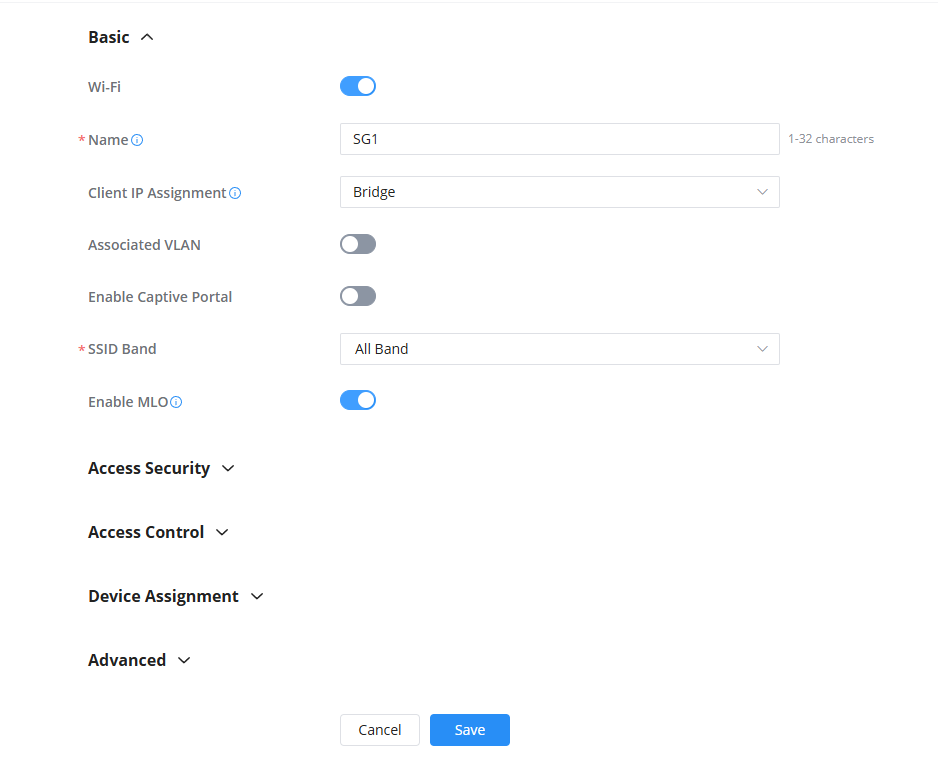
Thanks sir, i found it i spent way to much time looking and looked over the little enable MPI. toggle LOL
Curious, what kind of connection are you getting on it, What does your device say it connects at?
I don’t have any wifi 7 devices yet  I just connected my mac studio to the ap, and transferring the video i made of this to my backup, see how stable it its.
I’ll stay connected for a few weeks over wifi to see how stable it is too. The wifi6e Ap was very stable so i can’t see this one not being stable…
1 Like
I’ve been using mine for a week now and no issues doing anything I just cannot connect as fast as my other devices. Get about 344Mbps on 5ghz. Not a speed test, just what it says. I show 1200Mbps or higher on a 7664/7665.
I’ll check your video when I get a break.
1 Like
I’ll spin up my iperf test server and do some iperf testing. See what i get through it. Although it might not be much because the mac studio doesn’t have wifi 7 or 6e.
Wi-Fi
- 802.11ax Wi-Fi 6 wireless networking
- IEEE 802.11a/b/g/n/ac compatible
So it’s my phone, oneplus 13, wifi7 has some issues. Several folks on reddit having similar issues… Dang it! Hopefully an update will come out for it. And good video, very interested in your test results!
How many MAC address do you see on your device? Do you have a wlanpi or something equal? With wlanpi you can run a profiler, it grabs what your device can actually do with WiFi. Personally I have a 15pro that doesn’t support MLO. But can do 160 with 6ghz. Basic WiFi 6e support.
Lots of issues tonight, i could connected at 1.7Gbps then about 5 min later it would drop down to 300mp, and only way i could get it back to 1.7 was rebooting the ap. Did some iperf testing with the wifi6e wifi card i have and it runs but nothing to write home about yet.
2 Likes
Jason and I have been chatting quite a bit about this AP – I think GS needs to get a new firmware up and going. My AP placement in tomorrow’s video isn’t ideal – but based on my physical connect speed I’m not seeing the throughput I expect. I also need to tweak my setup and I have two APs close to each other so I’m sure there was a lot of interference – but I would assume BSS coloring should take care of some of that. We’ll see. Overall I’m happy with the AP but they need to get some bugs ironed out, I think.
1 Like
Yeah, so I fired up my old phone to see how it did, and getting the same connection, 344Mbps on the oneplus 10. A pixel 6 connected gets 2401/2401Mbps connection. Speedtest maxes out my 400/400 link without an issue on the pixel 6. I do think the firmware needs to be tweaked on these APs.
@Gibbyk Wlanpi looks pretty cool. Not sure if I need something like that for now. I don’t necessary use anything for wireless testing except using my own devices and seeing how they do.
@zak706 Yeah I didn’t know if you troubleshoot customers network and wifi and their devices on the wifi.
I will probably order one this week and test it with my wlanpi.
A majority of my clients are small offices. Doctors, real estate, accounting/lawyer firms, etc… and we can get away with one AP in a central location. I do use the app on my phone Network Analyzer App to check signal strength.