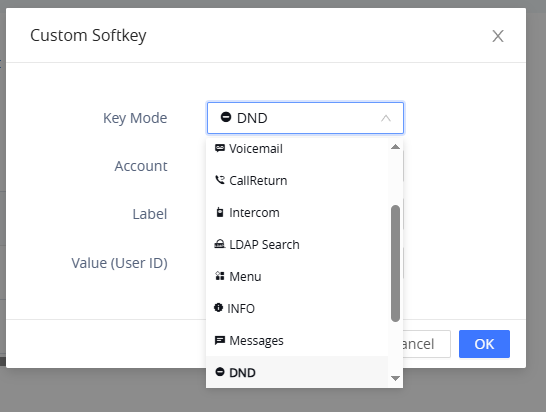
So I know I read or saw in a video where the buttons can show status - i.e. if an extension is in use, in DND, etc. - but in the system I’m deploying I am not seeing that behavior, at least in my testing of DND. I have it setup so that some of the phones have a DND button as a softkey. When it is pressed, a big ‘Do not Disturb’ comes up on the display but the buttons programmed on the other phones remain green for that extension. My understanding was it should change to orange in color.
If I dial the extension from another, I do immediately get the VM greeting about not being available so it does seem to be going into DND mode.
I asked ChatGPT and Google Gemini and both pointed me to Presence monitoring and/or Eventlist creation and setting the button as Eventlist BLF. Doing that still didn’t show the extension to be in DND.
I’m likely missing something somewhere. Where should I look?
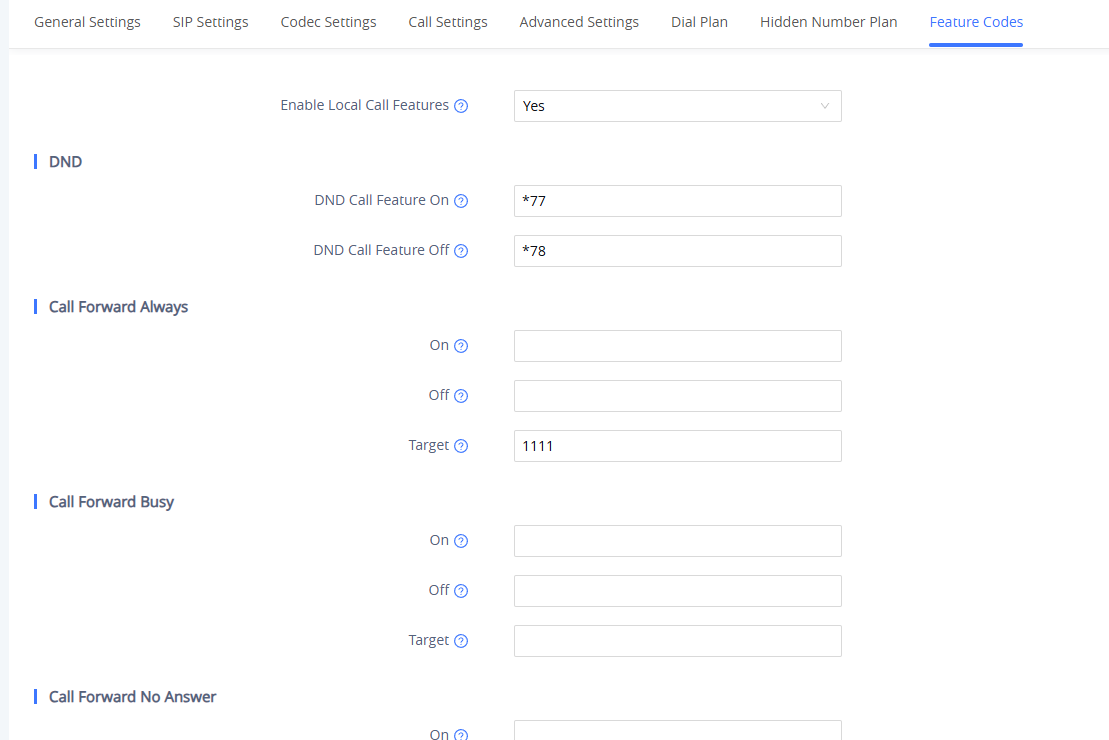
Found it here, I am directly on my phone. Edit the account and go to features codes. Set the dnd on and off and after that when you press the mute button it will dial *77 to turn it on and *78 to turn if off.
OK, thanks!! So, if I’m following right, I need to remove the DND softkey and have users use the ‘mute’ button when not in a call so it kicks it on/off. Correct?
Using a UCM63xx and GRP261X phones I see the default function of the mute button on the phone when idle works as DND. I can’t say for sure that it will reflect on the BLF of other phones, but I can check that and report back.
Well, still working through this. Users weren’t a fan of the DND button ‘dialing’ *77 to enable or *78 to disable vs the mute button just immediately saying “do not disturb”. Why “regular” DND doesn’t show on the BLF is baffling to me. Maybe GS can add this in a firmware update? Unless I’m totally missing something.
But certain users want a secretary or receptionist to see a red or some indication on the BLF that a user is in DND. Currently they remain green. Could be a config issue but I don’t think so. Nothing is jumping out at me, at least.
Yeah I always thought it should just go red when you hit the mute button but that’s the way they do it. If it would just go into DND without announcing it that would be great.
Wanting to bring this back to the top again. Just curious if anyone has any ideas or suggestions or is aware of anything changing in recent updates.
It baffles me that these phones don’t have this basic feature like systems from decades ago did. DND should indicate by some color other than green on the button it’s programmed on…
I believe the reason that DND does not turn the blf red on other phones is because you can have 10 phones registered to 1 extension and if the DND did put the extension in do not disturb it would do it for any device that was registered to that extension.
That is why grandstream gives you the *77/*78 to enable for the presence of you want. From my testing a long time ago once you set the phone to use the feature codes for DND then pressing the mic button will show Do not disturb on the phone and put the extension in DND status and change blf colors.
Ah, OK. I had not considered the “more than one phone on an extension” thing. Still…would be nice if it was a feature with a toggle or something, able to tell it to update the BLF or not. Then it could be turned off if more than one phone was utilizing the same extension.
I believe I tested the *77/*78 codes and didn’t have any luck but I will try again. I know the users weren’t a fan of that vs just hitting the button and it enabling it without dialing the code. I will test further when I have some time after hours or something.