Hello, Is there a way to map a user folder on a Windows 11 desktop? I do not want to create shared folder each user (wife and sons) 
Can you browse to the nas by typing,
\nasname\user folder in the run box? that should be a double \ behind nas name, it won’t let me type that.
If you can get that far, then you can right click on the folder, choose show more options, then you should see map network drive. you could also use the “net use” command at a cmd prompt
Make sure samba is installed on the nas.
I needed to map the \x.x.x.x\Personal_Folder not the User Folder, without the user’s name. Will default to the User Folder based on the login credentials.
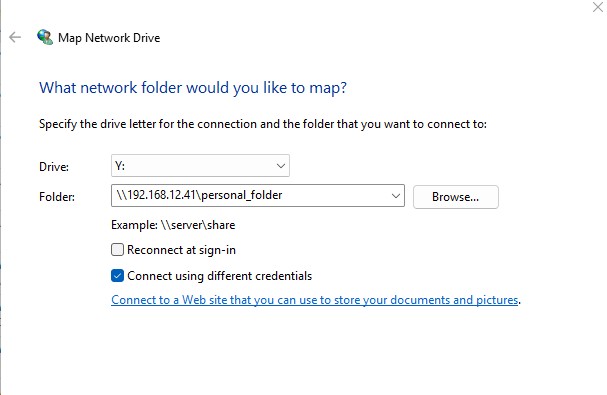
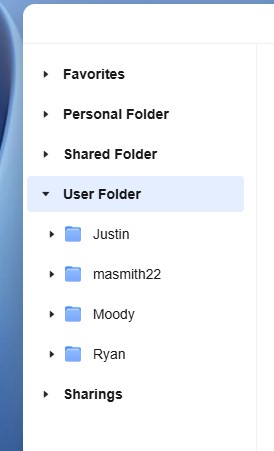
Ahh, ok. I have not used mine that way, so was not aware. And if you try and change in the mapping name right there it won’t let you?
This was the only way I was able to map the user folder. If you find another way please share. I use the map drive to create a shortcut on the desktop to make it easier to access the NAS. I also use robocopy to backup files to the NAS.
So I just tested this on mine, when I type \mynas and hit enter I see the test users personal folder I created and the “share” I created. At this point I can right click on either of those folders and map a drive to it.
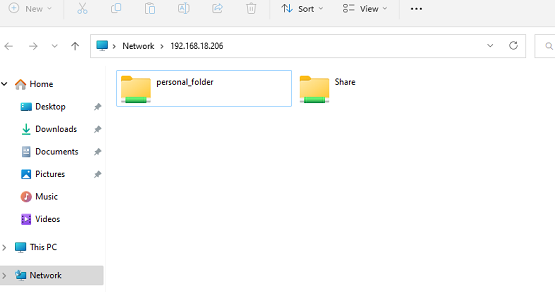
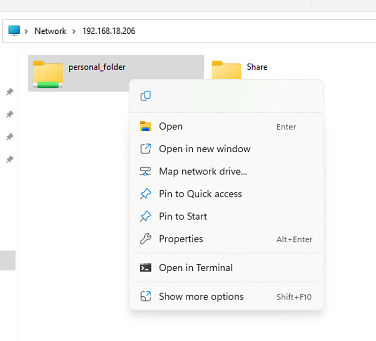
Hope this helps.
Yes, I had to map the “personal_folder”, not the “use folder”.