Hello !
I am currently trying to optimize my recently set-up network :
Starlink antenna → Starlink router and power supply combo (integrated wifi 2,4 and 5 GHz) → Network switch → PoE+ injectors → GWN 7665 APs (Master and Slave).
I am pretty sure that the integrated WiFi on the Starlink Router is interfering pretty badly with the signal of my two GWN 7665 APs. Moreover I don’t like having an unused SSID just sitting there.
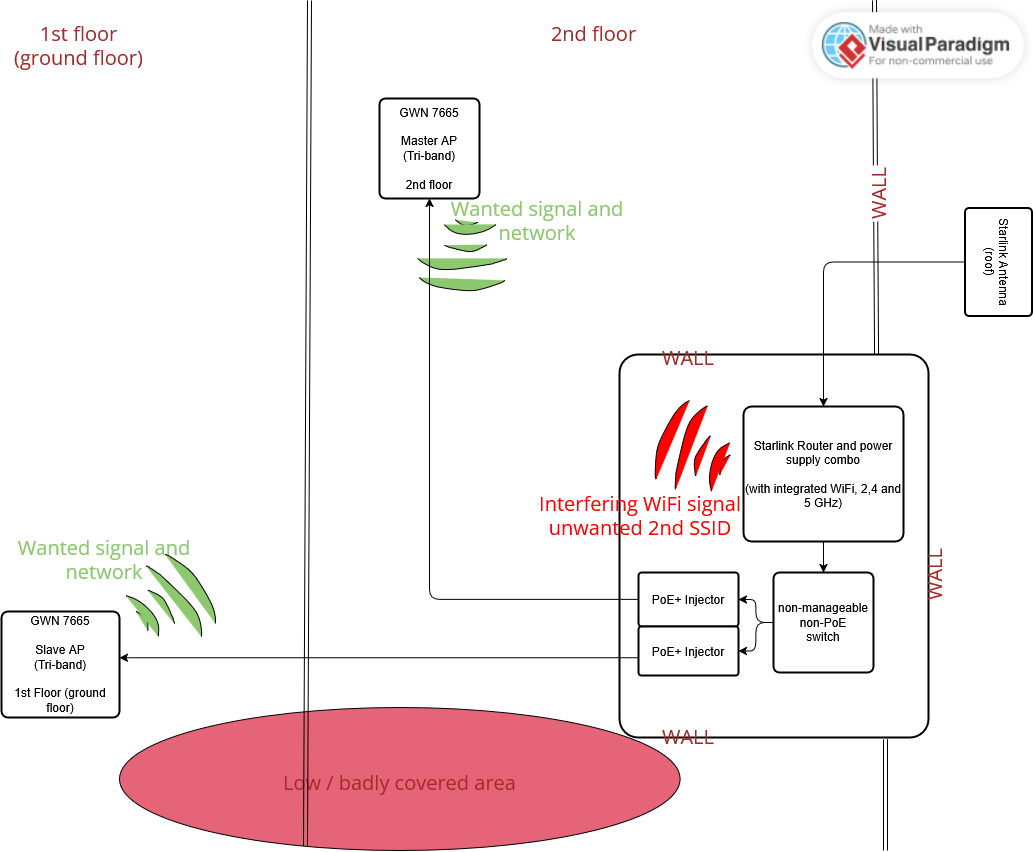
I know you can set the starlink router into “bypass” mode, which unfortunately turns off both WiFi and routing, leaving only the power supply and the conversion towards standard Ethernet pinout functionnality.
There are both DHCP and NAT service options available on the web interface of my APs.
Since I am fairly new to all this networking stuff and even more to Grandstream products, I don’t know if the options available here are enough to replace the routing job of the starlink router.
I know all that is needed to use a third-party router instead of starlink’s, is to turn on bypass mode and, after connecting the new router to the starlink router (in bypass mode) via ethernet, to setup a static route to 192.168.100.0 (Starlink’s suggested IP) in WAN Auto IP.
Any advice is welcome.
Thank you for your time and have a great day !
BD